
Your 2018 TV Buying Guide
Thinking of buying a new TV in 2018?
 Join us in this comprehensive guide to TV technology, with some hand-picked buying suggestions from Sam Baldry.
(source – www.midwich.com)
Choosing your TV screen size
In 2009, just 32% of global TV sales were accounted for by screens sized 40” or higher. Fast forward to 2016, and over 30 million people (more than half of the UK adult population at the time) were relaxing in front of a 40+ inch display at home.
As technology becomes cheaper and quality continues to improve exponentially, large screen TVs are more popular than ever before, but there’s still a lot to consider when it comes to choosing the right size to suit your needs.
One important thing to consider when buying a TV is how far you’ll be from the screen. As a guide, viewers should be sitting at a distance of around 1.5-2x the screen’s diagonal.
As we all know, however, bigger is generally better when it comes to viewing experience. For the average living room, 55”-65” is an ideal size, especially for 4K/UHD TVs which allow users to sit a little closer due to having a higher resolution.
Take a look at this handy infographic from Rtings.com which explains the UHD difference:
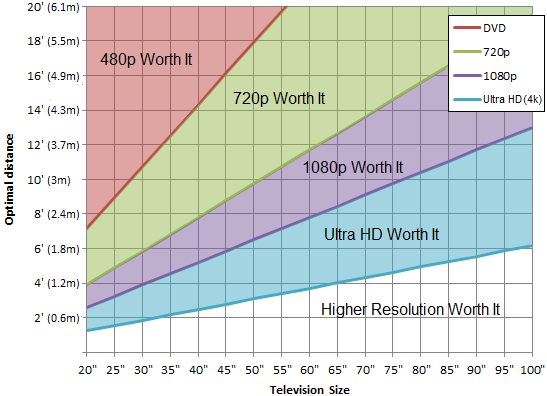
Bigger screens and better resolutions are definitely shaking up the TV market. It’s expected that by 2020, revenues from streaming services like Netflix and Amazon will completely overtake cinema box office spending. And with hundreds of HD films and programmes on offer from the comfort of your own home, this prediction doesn’t come as a surprise. Why not jump on the trend and bring the cinema right into your living room?
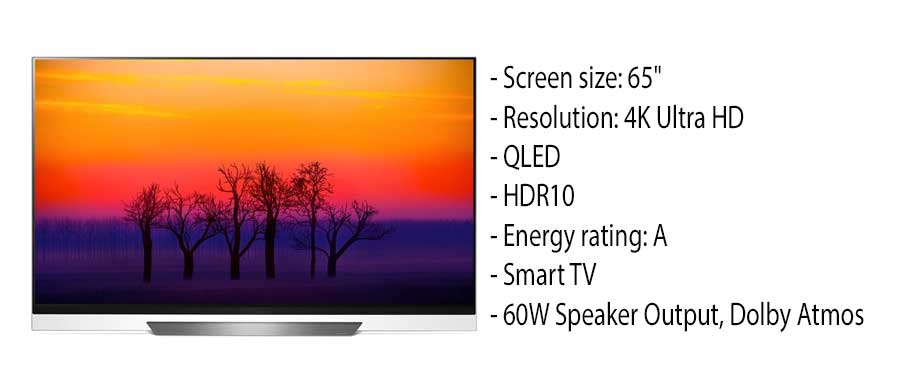
This classy 65” OLED TV from LG is great for watching anywhere from about a metre away:
Choosing your TV screen type
Long gone are the days of grainy cathode ray tube TVs, and as strange as it may seem, traditional LCD screens have all but disappeared from the market too. Since LED screens (their immediate successor) began providing an energy efficient alternative a number of years ago, technology has now branched out to offer OLED and QLED screens. But what do all the acronyms mean, and are they really all that different?
LED
LED screens come in two main variations, edge-lit and direct (back-lit). Each come with their own advantages and disadvantages:
 Edge-lit
As the name suggests, edge-lit LED screens feature a border of lights behind one or more sides of the screen. A light diffuser reflects the light evenly across the display, making it a cheap option that is usually found in entry-level screens. This configuration means that edge-lighting can also be used for much thinner displays than other methods.
Due to the relatively low number of LEDs, light distribution can become unbalanced if multiple bulbs break. They are also liable to appear ‘cloudy’ in dark environments due to backlight bleed.
Direct (back-lit)
In back-lit screens, the LED configuration is spread evenly behind the diffuser in several rows. Segmented lights enable local dimming for a better contrast ratio and less leakage in darker areas.
Despite being marginally bulkier and pricier than their edge-lit alternatives, direct lit screens are becoming a popular choice for consumer TVs and are steadily lowering in price as technology improves.
OLED and QLED
With various brands adopting their own acronyms for the newest fangled technologies, it’s sometimes difficult to discern the facts. Luckily, we’ve done the work for you!
OLED
Whereas traditional LED screens are lit by a backlight, OLED screens provide a completely different technology in the form of Organic Light Emitting Diodes that provide their own light. This self-emissive method makes for high-contrast ratios, able to achieve true blacks as the pixels can be turned off completely. The single pixels in OLED also offer much richer and more vivid colours than LED at a lower energy consumption level, and the lack of a backlight makes for a much thinner screen. OLED is also unrivalled in terms of viewing angle, with a consistent picture quality from almost any angle.
As a relatively new technology, OLED also currently comes with a hefty price tag, although this is expected to lessen in coming years.
One of the big players investing in this technology is LG, who dominate the wider OLED market with models such as this LG
55″ OLED screen with 4K Ultra HD resolution.
QLED
Samsung’s leap into the future of Consumer TV comes in the form of their own-branded QLED screens that have since been taken up by other companies too. In effect, these are very alike to LED screens, the main difference being that they use Samsung’s ‘quantum dot technology’ (hence the ‘Q’). This enhances colour, the blue light from the LEDs working separately to red and green light created by the dots themselves. QLEDs are also treated with a low-reflectivity finish and peak luminance of 1,500-2,000cd/m2 for better contrast.
For now, having a backlight still creates many of the same downsides as with LED TV, such as imperfect black levels and contrast in certain light settings. However, Samsung are working towards developing ‘true QLED’ using organic LEDs in the very near future.
Choosing your TV resolution
These days, you’d be hard pressed to find a retailer that stocks anything less than HD res (1080p). It’s down to you to decide which resolution best suits your budget and required screen size, but as a rule: more pixels = higher resolution = sharper picture quality.
 If you’re unsure of what to quote, head back up to the screen size graph to see the minimum resolution required to get the most out of your display from any distance. Bear in mind that you can get away with sitting a lot closer to HD/UHD displays for a more immersive experience, so take this as a guide rather than gospel.
So, how many pixels are you getting exactly?
How does UHD ‘4K’ differ from full HD?
Up until a few years ago, 1080p was the standard for top-quality home displays. Even though 4K UHD (which isn’t actually true 4K – we’ll come to that later) has been around since 2003, and began being supported by Youtube in 2010, it’s only just started to make its way into people’s homes due to increased availability of the technology. In 2016, 16% of US households owned a 4K UHD TV, with a further 11% planning on upgrading in 2017, which shows the impressive growth the technology has made in a few short years.
Full 1080p HD is marginally bigger than 720p, but 4K UHD blows the rest out of the water. If you didn’t know, the ‘4’ in 4K not only stands for its 4,000 (or thereabouts) pixels, it’s also four times the size of a standard 1080p HD screen.
So what’s true 4K then?
‘True’, ‘envelope’, or ‘DCI’ 4K is something which is yet to reach the consumer market. Currently only used in film and television production, this resolution has 4096 x 2160 (8,847,360 total) pixels. Users can watch true 4K on 4K UHD screens, but it’ll be a few years before you’ll be able to see this resolution in all its glory outside of the cinema.
New Technologies
With lots of competition from smaller devices such as phones and tablets offering mobile viewing for the on-the-go user, there’s a lot of pressure on TV manufacturers to make the home viewing experience worthwhile (and remind people of what they’re missing when switching to a smaller screen!)
HDR
High Dynamic Range (HDR) is a feature of 4K UHD screens which boosts colours, contrast and brightness. Much like OLED/QLED/ULED, there are a range of variations from to choose from here: As well Ultra HD Premium and Open standard HDR which are available across the board for playing HDR content, Dolby Vision and Technicolor Advanced HDR are also contributors to the trend. It may take a little while before HDR becomes the default standard, but it almost certainly will within the next 5-10 years.

HDR is an important thing to consider when buying a screen to ensure you’re getting the most out of your 4K content, but be sure to check which screens are compatible with each variant of the technology.
Smart TVs
TV is no longer just TV, and if you’re selling a screen that doesn’t have Smart capabilities, you may be missing a trick. Netflix is now the preferred TV viewing source for all demographic groups by a long stretch, with 33% of those surveyed marking it as their most frequent source compared to just 16% for TV channels.
Smart TVs are actually a lot more like computers than televisions, allowing users to access a variety of apps, browsers, social media platforms and even online gaming:
So, there you have it! Everything you’ll ever need to know to choose the TV screen of your dreams

Comments are closed here.